This Guide is for the Queue Manager to Log Users in/out of the Queue. To Log yourself In/Out of the queue, follow this guide: https://www.jansait.com/wiki/log-in-out-of-queue/
Once you have been Assigned Queue Manager Permissions you can Log Extensions in/out of the queue as required by following these steps:
- Open the 3CX Windows App on your PC
- Open the Manager Panel (Using the Panel Icon between the Close and Minimise Icons)
- Ensure the Queue is selected in top left of the Manager Panel
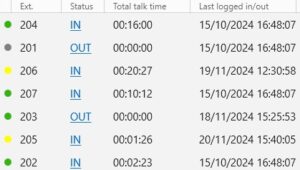
- You can now toggle the IN/OUT options to add and remove extensions from the Queue.
Remember:
- IN means the extension will be part of the queue and ring when incoming calls hit the Queue.
- OUT means the extension will not receive calls from the Queue.
If you need any assistance our expert support team are here to help, email support@jansait.com or call 0208 819 8089