To Start/Stop Recording the following must apply:
- 3CX Enterprise Licence
- Start/Stop Recording Permission Set for your Extension
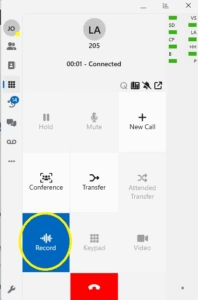
Start/Stop Recording on Windows App (Softphone Mode):
- During the Call, Toggle the Record Button Circled below
Start Stop Recording on Web App:
- During the Call, Toggle the Record Button Circled below

Start Stop Recording on Android/iOS App:
- During the Call, Toggle the Record Button Circled below

Start Stop Recording on your Desk IP Phone:
- During the Call, Toggle the Record Button in either the Web App or Windows App (in CTI Mode*) Circled below
*for the Windows App to control your IP Desk Phone it must be in CTI Mode, Follow this Guide: https://www.jansait.com/wiki/windows-app-phone-cti-mode/