TeamViewer is a remote access tool which allows people to take full control of your device. This is great when you need Tech Support etc but can also be used by Scammers to perform malicious actions.
! Before you give anyone access to your device make sure you know and trust them. !
To find your TeamViewer ID/Pwd:
- Click your Windows Start Button:

- Search for ‘TeamViewer’:
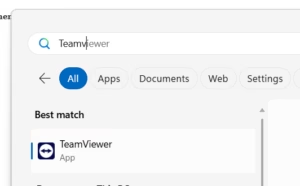
NOTE: if Teamviewer is not installed follow this guide: https://www.jansait.com/wiki/how-to-download-install-teamviewer/
- Open TeamViewer App, Select ‘Remote Control‘ on the left pane:
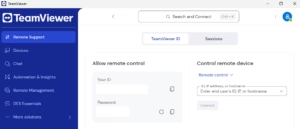
- Share ‘Your ID‘ and ‘Password‘ with your support Engineer
! REMEMBER: Only share these details with people you know and trust. !
Top Tip:
After a session is complete the Password should automatically change, however you can force it to refresh password which invalidates any previous passwords:

If you’re having trouble with above, you can reach out for support by calling 0208 819 8089 or emailing support@jansait.com.